Open thermal printing + CUPS + Wireguard
2026-06-02
I have been putting off getting a thermal printer that work on *nix + CUPS for quite a long time. Last time when I ordered, it was lost by courier service. I didn't look that afterwards but two weeks back I found a deal that's only 1/4 of it's price with added adhesive thermal rolls.
From my own exposure of CUPS 10+ years back, I had really low expections for it to
work on one go. Every phone call home during those years, I remember asking
whether the printer broke on update or is working fine, sometimes it was that pro
prietary HP CUPS driver, othertimes CUPS itself, it was fun times indeed!
Finally when I got back home on one summer break I switched back the PC to non rolling release and dug through
archives to finally settle on a foomatic driver for that HP laserjet. This was
also the printer that got one of the first 3d printer parts to replace a paper tray,
it's was so fragile that breaks when 5+ sheets printed back to back.
Coming to the present, the thermal printer I acquired was Phomemo M02,
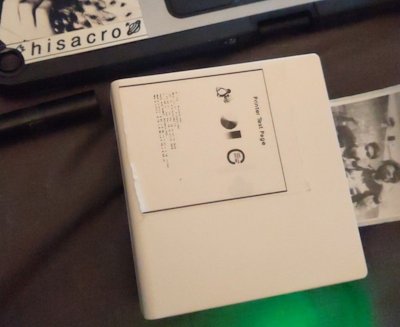
A good soul has reverse engineerined the bluetooth packets and figured it's using EPSON ESC/POS Commands! Source code of the drivers,
github - vivier/phomemo-tools
Before testing out the CUPS driver I wanted to make sure the drivers worked.
It has been documented in the driver page on using rfcomm to
emulate serial connection over bluetooth so those ESC/POS commands can be
sent.
Following the above,
$ bluetoothctl pair <id Mr.in_M02> # It gets stuck on connection
$                                     # but seems to work fine that way
$                                     # as well
$ rfcomm connect 0 <id Mr.in_M02>  # keep it live
$ phomemo-filter gulk.png > /dev/rfcomm0
It was success but I noticed the rate at which it printed was dynamic and due to this there is gradient of greyscale in the print.
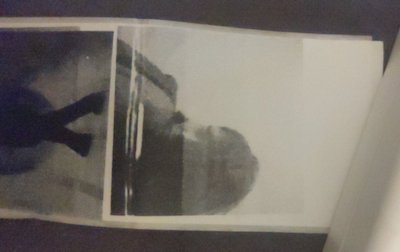
Unsure of the reason, someone has raised an issue as well. I suspect it might be the delay in the serial communication over bluetooth but unsure myself. Anyways printing via CUPS solved it.
Network printing via CUPS + Wireguard
Having really low expectations, I was well prepared for the hair plugging before configuring CUPS for bluetooth printer.
The main machine that has made the connection to M02 is running Endeavours OS and to my surprise just after installation the aur package, the printer got listed on the CUPS automatically.
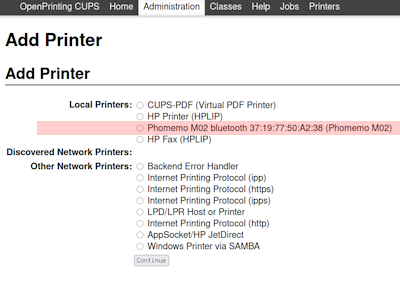
I printed the test page successfully on the first go! After all these years, seeing that page brought those memories. I slapped it on the top of the printer, because it's an adhesive thermal roll.
This experience made me optimistic and went on to configure it as network
printer. On the /etc/cupsd.conf file,
<Location />
  Order allow,deny
  Allow all
</Location>
This allows access to all the machine connected via network. This can also be done with gui (modifying the printer) and opting for "Share the printer" + "Allow printing from the Internet". By default the CUPS interface runs on the port 631 and to make this CUPS server visible on the network, I need to enable tcp on this.
Endeavour OS uses firewalld by default, and following opens the port,
$ sudo firewall-cmd --zone=public --add-port=631/tcp --permanent
Now to cast the visibility of the printer over network, Avahi package can be used. I thought this will be a neat addition, and the phones that's on wireguard can also print.
Following the arch wiki for config, I have edited the nsswitch.conf and
enabled the avahi-daemon and cups services. Later I found that wireguard
doesn't tunnel these automatically, and added /etc/avahi/avahi-daemon.conf
[server]
allow-interfaces=eth0,wg0,wlan0
[reflector]
enable-reflector=yes
There have been openwrt threads online regarding this, letting avahi to annouche the ports over wireguard but I couldn't get it working so I settled for manual configuration.
On the EOS machine connected to the printer, the following lists the open ports,
# sudo firewall-cmd --zone=public --add-port=5353/udp --permanent
# sudo firewall-cmd --list-all-zones

public (default, active)
  target: default
  ingress-priority: 0
  egress-priority: 0
  icmp-block-inversion: no
  interfaces: wlan0
  sources:
  services: dhcpv6-client kdeconnect mosh ssh
  ports: 1234/tcp 631/tcp 5353/udp
  protocols:
  forward: yes
  masquerade: no
  forward-ports:
  source-ports:
  icmp-blocks:
  rich rules:
The ports field above tells the active open ports.
Client Machines
CUPS exposes the printer using IPP Everywhere protocol and all other devices uses the driver code on the host machine.
I have different devices on displ's wireguard, and I can get messages/photos out of the blue from my people, and if I hand them the same device it could be 2 way like a fax machine!
1. CUPS on *nix
To add printer on client *nix machine, it's easier using the html frontend on localhost:631,
Note: It's not necessary to have phomemo-tools on these clients.
Add Printer -> Other Network Printers:
Internet Printing Protocol (ipp)
Connection: ipp://<wireguard_local_add>:631/printers/<name>
Make: Generic
Model: IPP Everywhere TM
Media size: 50x60mm
Set Default Options
To print photos, I prefer the Geeqie gui since it has customization for media size and preview before printing on the thermal roll.
2. Android
I had a boogle device for installing ubports and it has inbuilt android service. It didn't discover by default but has option to add printers by ip,
Setting -> printer -> add by ip.
<wireguard_local_add>:631/printers/<name>
Again to my surprise it worked, but I haven't been able to make it work on non booogle older phones. I got the [cups-android] installed but it drops the connection when I try to print.
3. Ubports
I had troubles on getting wireguard working on Uports, first off was the kernal but I believe 24.04 has wireguard baked into it. I can also see a clickable app by Gloomydemin. At the moment only Golu the Gulk is rocking Ubports on Xperia X so this section will be updated in future!
We have already finished a roll and each time I was trying to predict what might be printed. It took me a while to stop starring, haha. This is my favorite chunk of that roll,
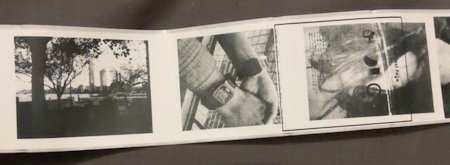
It's crazy to think some of these snapshots travelled all the way around the globe to get printed directly in front of me (same has been shared by gulk on her gemini den) I have ordered some color rolls to print, I might send the finished rolls over post in future ;)